Data center infrastructure is the physical and electrical foundation that keeps IT equipment powered, cooled, protected, housed, and manageable. It includes the power path, backup energy, power distribution, cooling equipment, cabinets, cabling routes, environmental monitoring, and the supporting site systems around them. Servers and network switches perform the computing work; infrastructure is what keeps them running when utility power fluctuates, heat rises, or the deployment has to fit into a constrained location.
For buyers, the useful way to define data center infrastructure is by function, not by a loose list of hardware: maintain power, remove heat, organize equipment, and support safe operation and maintenance. A weak link in any one of those functions can limit the whole site.
Data center infrastructure is the connected power, cooling, distribution, enclosure, and support system behind IT availability
The power layer brings incoming electricity to IT loads, conditions it, provides ride-through or backup during disturbances, and distributes it through protected paths. The cooling layer removes the heat those loads generate and controls the room conditions around them. Cabinets and racks create the physical structure for servers, network devices, power equipment, and cable management. Supporting infrastructure covers items such as grounding, fire protection interfaces, access control, monitoring, and the practical service clearances technicians need.
These layers should be judged as a chain. A UPS can keep a server alive through a power event, but it cannot prevent an outage caused by an overheated room. A precision air conditioner may hold the required environment, yet poor cabinet layout can allow hot exhaust air to return to equipment intakes. That is why data center power infrastructure and cooling infrastructure are planned together rather than purchased as unrelated boxes.
Map the infrastructure layers to CPSY power, cooling, distribution, and cabinet solutions
CPSY supplies product categories that sit across the core physical infrastructure stack: UPS systems, UPS batteries and battery cabinets, precision air conditioners, precision power distribution equipment, integrated cabinets, outdoor integrated equipment, and customized micro-module data center solutions. The right mix depends on the load, site environment, maintenance model, and required growth path.
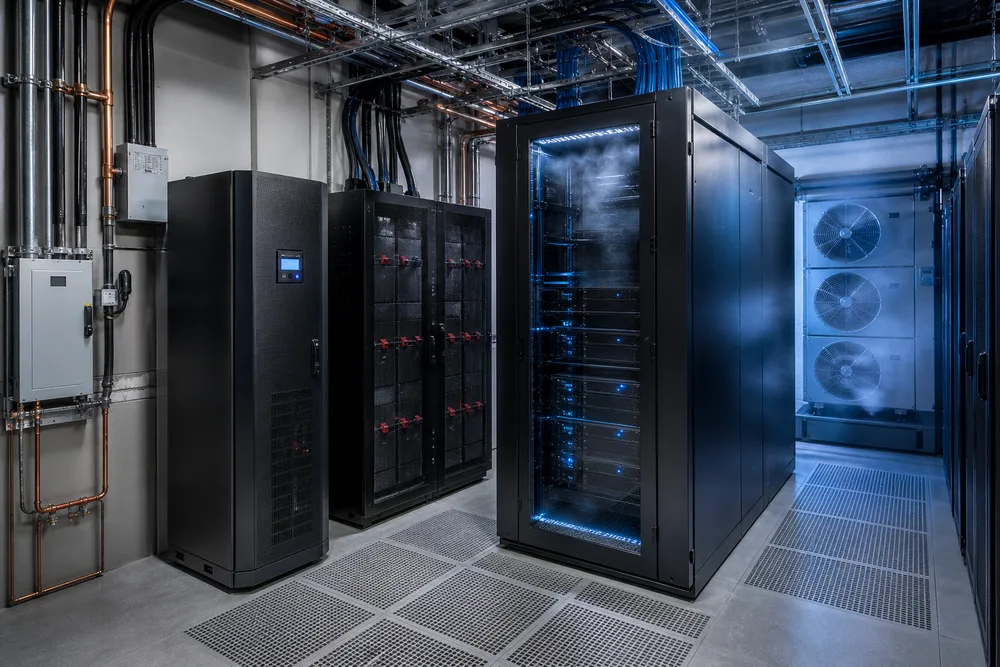
Maintain power continuity with UPS systems, UPS batteries, battery cabinets, and precision power distribution
A UPS sits between the source and critical load to help protect equipment from interruptions and power-quality events. CPSY lists line-interactive, high-frequency online, low-frequency online, modular, rack-mount, outdoor, and lithium UPS categories. Those categories are not interchangeable. Buyers should first establish the load profile, runtime expectation, installation setting, maintenance access, and how future capacity will be added.
The battery system provides stored energy for the required backup period. CPSY offers LiFePO4 and VRLA AGM/GEL battery options, along with battery cabinets. Chemistry is only one part of the decision. Battery placement, thermal conditions, replacement access, protection arrangements, and the planned inspection regime all affect service life and real-world availability.
After backup power is established, precision power distribution equipment carries it safely to downstream loads. Confirm circuit segregation, protective coordination, connection types, metering needs, and whether the distribution arrangement can be expanded without turning a small upgrade into a shutdown. A power distribution system that looks adequate on the first day often becomes the constraint after a few additional cabinets are installed.
Manage heat, equipment layout, and deployment space with precision air conditioning and integrated cabinets
Precision air conditioning is designed for the continuous, equipment-focused cooling duty found in server rooms and other critical IT spaces. Selection starts with actual heat load and room layout, then accounts for airflow paths, external conditions, redundancy expectations, condensate handling, and service access. Sizing cooling only from floor area is a common and costly mistake; a small room with dense IT equipment can demand more attention than a larger lightly loaded room.
Integrated cabinets bring equipment, cabling, distribution, and physical organization into a defined footprint. They can reduce on-site coordination work, but only if the cabinet configuration matches the devices, cable entry direction, cooling arrangement, and maintenance plan. Leave space for rear access and cable bends. A cabinet that is difficult to service is not a finished infrastructure design.
Why power, cooling, cabinets, and supporting infrastructure must be planned as one system
Every watt delivered to IT equipment becomes heat in the room. That simple fact links UPS selection, battery placement, distribution losses, cabinet density, and cooling capacity. It also explains why isolated purchasing creates avoidable problems: a battery cabinet may consume the area reserved for cooling service, or a new rack may exceed the available branch capacity and upset the airflow plan at the same time.
Plan the electrical route and the air route before equipment arrives. Identify where power enters, where it is conditioned and distributed, where heat leaves, how cables are segregated, and which components can be maintained while critical loads remain protected. Monitoring should give operators visibility of power status, temperature, alarms, and environmental exceptions, with responsibilities defined for responding to them. Hardware alone does not create availability; maintainable design does.
Choose the right infrastructure approach for server rooms, edge sites, and outdoor deployments
The infrastructure approach changes with location and operating conditions. A central server room usually prioritizes orderly expansion and controlled indoor cooling. An edge site may favor a compact integrated design because local technical support and floor space are limited. Outdoor locations introduce weather exposure, enclosure protection, and more variable ambient conditions.
Indoor server rooms and scalable micro-module data center projects
For indoor server rooms, separate-component designs can suit sites with existing rooms, established electrical infrastructure, or a need to phase investment. For repeatable deployments or compact IT rooms, a micro-module approach can bring cabinets, power, cooling, and supporting elements into a coordinated design. CPSY offers customized micro-module data center solutions alongside integrated cabinets and supporting power equipment.
Ask how the site will grow. Modular UPS options may be relevant where capacity expansion and service continuity are central concerns, while rack-mount UPS systems may fit smaller cabinet-based deployments. The correct choice rests on the operating plan, not on the word “modular” in a product name.
Telecom, security, industrial, and outdoor integrated equipment sites
Telecom, security, transport, and industrial sites often have distributed loads, limited local supervision, and tougher installation conditions than an indoor server room. Outdoor integrated equipment can help consolidate the enclosure and supporting systems, but buyers must define exposure conditions, available utility supply, communication requirements, physical security, and access for field maintenance before selecting it.
CPSY serves applications including telecom, manufacturing, medical, transport, government, finance, and data centers. Its UPS system categories include outdoor and lithium options, but site-specific compatibility still needs to be checked against the project brief.
What buyers should confirm before selecting data center infrastructure components
Start with the failure you are trying to prevent, then document the conditions the equipment must survive. Before requesting a proposal, confirm:
- Critical and non-critical loads, including the expected growth path and required backup duration.
- Incoming power conditions, downstream distribution needs, and any requirement for separate protected paths.
- IT equipment heat output, cabinet density, airflow direction, room dimensions, and local ambient conditions.
- Available floor area, cable routes, door widths, floor loading constraints, and service clearances.
- Indoor or outdoor installation, environmental exposure, remote alarm needs, and maintenance responsibility.
- Applicable local regulations, project specifications, and required documentation or certifications.
Do not choose on headline capacity alone. A technically suitable UPS, precision air conditioner, or cabinet can still be the wrong purchase if it cannot be serviced in place, integrated with the existing distribution, or expanded without disruptive rework.
Data Center Infrastructure FAQs and How to Start a CPSY Project Discussion
What are the essential data center infrastructure components? At minimum, plan for protected power, stored backup energy where required, distribution, cooling, cabinets or racks, cabling and grounding arrangements, and monitoring or site-support provisions. The exact scope changes by site type.
Can a UPS replace a generator? No. A UPS and battery system provide short-term continuity and power conditioning according to the configured system and battery arrangement. Long-duration backup, where needed, is a separate site-level design decision.
Is an integrated cabinet enough for a small server room? It may be part of the answer, not automatically the whole answer. You still need to confirm incoming power, cooling rejection, room conditions, network connections, grounding, and maintenance access.
Bring your load list, site drawings, runtime objective, operating environment, and expansion plan to the first discussion. You can review CPSY's data center power and cooling solutions and begin a project conversation with a clearer basis for selecting compatible infrastructure components.