A room-type modular data center is a factory-integrated indoor system for deploying IT racks, power, cooling, monitoring, and aisle containment as one coordinated environment
A room-type modular data center packages the main technical systems of a small data center into repeatable cabinet-based assemblies. Instead of designing racks, UPS equipment, distribution, cooling, controls, and containment as separate construction packages, the supplier coordinates them before shipment. The modules are then installed inside a prepared building.
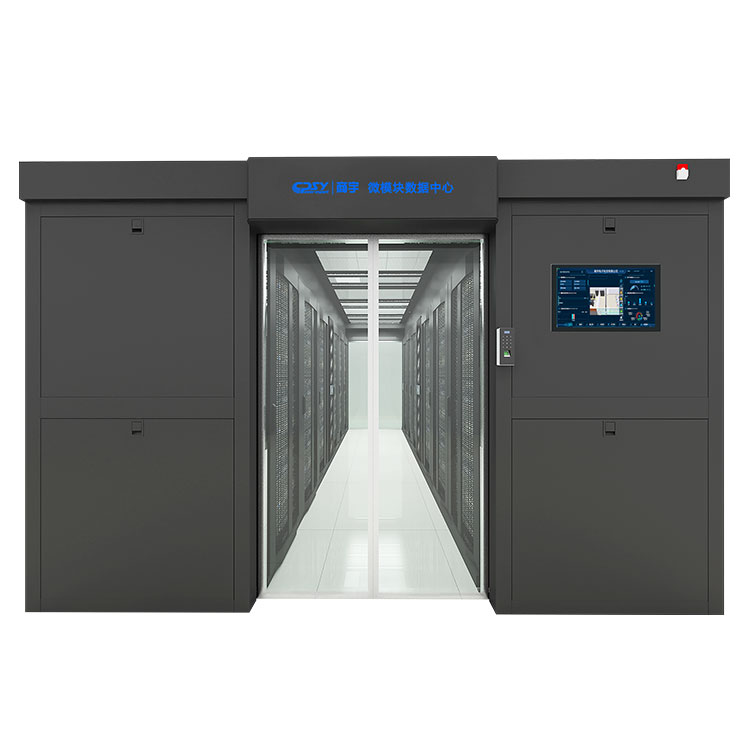
This makes it an indoor prefabricated modular data center—not an outdoor container and not merely a server cabinet with an air conditioner attached. CPSY also uses the term “micro-module data center” for this category. The practical value is coordination: airflow paths, equipment placement, cable routing, power distribution, and monitoring interfaces are designed to function together.
What is integrated at the factory, and what work still happens at the site?
Factory integration covers the repeatable equipment package. Building conditions remain a site responsibility. That distinction matters because a preassembled system can shorten installation without turning an unfinished room into a commissioned data center by itself.
CPSY combines 42U IT cabinets with configurable UPS, batteries, power distribution, PDUs, precision cooling, monitoring, security, and leak detection
The Standardized design concept used for the CPSY room-type modular data center brings predesigned components into coordinated EC and IT cabinet assemblies. Depending on the project, that package can include 42U racks, UPS systems, batteries, precision power distribution, rack PDUs, inter-row or room-level precision cooling, environmental monitoring, access control, cameras, and water-leak detection.
Components are preinstalled and pre-debugged at the factory, then shipped in cabinet-based units. This reduces field wiring and avoids a common small-server-room problem: equipment from several vendors physically fits, but controls, airflow, breaker coordination, or service clearances were never checked as a complete system.
The reported five-hour installation refers to cabinet combination—not site preparation, utility connections, permitting, testing, or commissioning
CPSY reports that cabinet combination and overall assembly can take about five hours. Buyers shouldn’t read that as five hours from an empty room to live IT load. The room still needs suitable floor loading, access routes, utility power, grounding and bonding, heat rejection provisions, network connections, fire protection coordination, and any required permits.
Final work also includes terminations, controls integration, startup, alarm checks, cooling tests, UPS and battery verification, and commissioning. Shipping damage or a doorway that is too narrow can erase the schedule advantage quickly. Survey the full delivery path, including elevators, turning radii, thresholds, and loading-dock limits.
Enclosed hot or cold aisles keep supply and return air separated, improving thermal control while reducing dust and noise
A contained aisle prevents cooled supply air from mixing freely with hot server exhaust. In cold-aisle containment, the server inlets occupy the enclosure; in hot-aisle containment, exhaust air is captured and returned to the cooling equipment. Either arrangement can improve inlet-temperature control when blanking panels, floor openings, rack alignment, and fan direction are handled correctly.
The enclosed hot or cold aisle design can also limit dust movement and reduce perceived equipment noise outside the enclosed passage. It doesn’t replace room filtration or guarantee a specific acoustic rating. Missing blanking panels, open cable cutouts, and poorly fitted doors create bypass airflow that defeats containment even when the cooling unit has enough nominal capacity.
Capacity planning must match rack count, IT load, rack density, runtime, redundancy, and expansion—not rely on maximum ratings alone
The largest published rack count, UPS rating, and cooling capacity don’t necessarily describe one simultaneously available configuration. Capacity depends on equipment selection, redundancy, ambient conditions, battery runtime, and the distribution of load among racks. A 48-cabinet layout with lightly loaded network racks behaves differently from a smaller installation filled with dense compute equipment.
CPSY lists configurations of up to 48 cabinets, 180 kW module power consumption, 80–300 kVA UPS capacity, 13–40 kW inter-row cooling, and 8–102 kW room-level cooling
These figures define the published configuration range, not a substitute for project engineering. UPS capacity must be checked against the actual real-power load, power factor, redundancy arrangement, recharge demand, and expected growth. Battery selection depends on required runtime and operating conditions. Cooling selection must account for sensible IT heat, UPS and distribution losses, room heat gain, airflow, and the selected duty/standby strategy.
Ask for a configuration-specific schedule showing which ratings apply together. The published room-type modular data center specifications are a useful starting boundary, but the approved submittal should define the equipment you’re actually buying.
AI inference and other dense edge workloads require configuration-specific confirmation of per-rack power, cooling capacity, airflow, and supported redundancy
High aggregate capacity doesn’t prove that every rack can support the same load. Dense AI inference servers may create localized heat and airflow demand beyond what a conventional rack lineup was designed to handle. Confirm allowable power per rack, PDU outlet and branch-circuit ratings, cooling-unit placement, server airflow direction, and containment pressure behavior.
Also ask what happens after one cooling or power component is unavailable. If the remaining equipment can’t carry the required load, the design may have standby hardware without delivering the redundancy your operation expects.
Room-type modular systems suit server rooms, branch offices, edge sites, and phased growth—but differ from conventional buildouts and outdoor container modules
This format fits government and financial branch sites, telecommunications rooms, healthcare and education facilities, industrial locations, small-business server rooms, edge deployments, and 5G support sites. It is particularly useful where a repeatable design must be copied across multiple locations or expanded later by adding cabinet combinations on either side.
Compared with a conventional buildout, the modular approach shifts more integration and testing to the factory and can reduce on-site trade coordination. The trade-off is less freedom to improvise after procurement; room geometry, utility capacity, and expansion direction need early confirmation. Outdoor container modules provide a weather-resistant enclosure and may suit sites without usable indoor space. A room-type system depends on the host building for weather protection, structural support, fire strategy, and much of the physical security.
Before buying, verify total project cost, site readiness, service access, expansion plans, and U.S. electrical and code compatibility—including 60 Hz design, voltage, NEC coordination, AHJ approval, and applicable NRTL listings; 380/400/415 VAC specifications, CE, or RoHS alone are not proof of compliance
Use the following checks to compare proposals on equal terms:
- Electrical compatibility: Confirm input and output voltage, phase arrangement, 60 Hz operation, available fault current, breaker coordination, grounding, and upstream service capacity.
- U.S. acceptance: Identify applicable National Electrical Code requirements, the authority having jurisdiction, required permits, and any NRTL listing expected for the complete equipment or its components. CE and RoHS address different requirements and don’t establish U.S. code approval.
- Full installed cost: Include freight, rigging, site electrical work, heat rejection, fire-system changes, controls integration, startup, commissioning, training, and maintenance—not just the cabinet package.
- Serviceability: Check front, rear, and overhead access; battery replacement paths; filter and fan access; spare-parts availability; and local technician coverage.
- Expansion: Reserve floor area, utility capacity, cooling support, network pathways, and the correct physical side for future cabinet combinations.
- Performance documentation: Require a project-specific rack layout, single-line diagram, cooling selection, runtime basis, redundancy statement, alarm list, and acceptance-test plan.