- English
- Español
- Português
- русский
- Français
- 日本語
- Deutsch
- tiếng Việt
- Italiano
- Nederlands
- ภาษาไทย
- Polski
- 한국어
- Svenska
- magyar
- Malay
- বাংলা ভাষার
- Dansk
- Suomi
- हिन्दी
- Pilipino
- Türkçe
- Gaeilge
- العربية
- Indonesia
- Norsk
- تمل
- český
- ελληνικά
- український
- Javanese
- فارسی
- தமிழ்
- తెలుగు
- नेपाली
- Burmese
- български
- ລາວ
- Latine
- Қазақша
- Euskal
- Azərbaycan
- Slovenský jazyk
- Македонски
- Lietuvos
- Eesti Keel
- Română
- Slovenski
- मराठी
- Srpski језик

Why Choose Precision Power Distribution for a Data Center?
A data center can have a healthy UPS, good rack PDUs, and no active alarms—then discover a heavily loaded branch circuit during an expansion, a breaker trip after a maintenance change, or an energy-use problem no one can assign to a cabinet. The weak point is often not generation or backup power. It is the distribution layer between the source and the IT racks.
The short answer: choose Precision Power Distribution when you need to see, alarm on, and manage power at the cabinet and branch-circuit level rather than treating distribution as a passive electrical panel. That visibility helps operators find load imbalance earlier, plan available capacity with better evidence, and isolate faults without guessing which downstream circuits are affected.
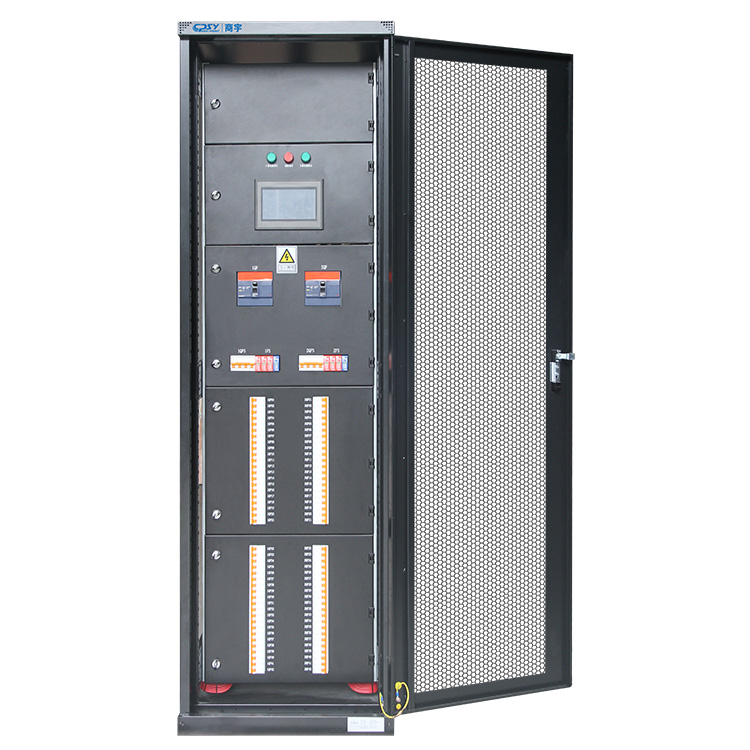
Choose precision distribution when the cabinet—not only the rack—must expose load risk and energy use
A conventional distribution cabinet delivers electricity. An intelligent power distribution cabinet also reports what is happening to it. That distinction matters once a server room has enough circuits, cabinets, tenants, or changing workloads that a spreadsheet and occasional meter reading no longer tell the full story.
Precision distribution cabinets place monitoring at the point where a source is divided into outgoing circuits. Current, voltage, power, energy, breaker state, and alarm conditions can be collected at the cabinet and, where configured, by branch. Instead of learning about an overloaded circuit after a breaker opens, your team can set operating thresholds and investigate a rising load before it becomes an outage.
The benefit is not merely more data. It is usable accountability. Cabinet-level energy monitoring can help distinguish a loaded cabinet from one that only appears loaded because of a broad room-level reading. Branch-level information also makes capacity discussions more disciplined: operations can review actual circuit behavior before approving a new rack, rather than relying on nameplate assumptions.
CPSY positions its precision power distribution cabinets as terminal distribution equipment for data centers and computer rooms. Its stated configurations include configurable branch circuits, branch monitoring, alarms, a 7-inch touch-screen HMI, and Modbus communication. Those functions are useful only if they are commissioned correctly and reviewed by someone. A touch screen does not substitute for alarm ownership, baseline measurements, or a change-control process.
How intelligent branch monitoring supports faster, better-informed power operations
Branch monitoring works because it narrows the search area. A source-level meter can confirm that a UPS output or cabinet is carrying more load than expected. It cannot necessarily show which outgoing circuit changed, whether one phase is carrying disproportionate current, or whether a particular branch is approaching its operating limit. Per-branch data gives the operator a practical place to start.
That matters during three common events. First, a capacity request: the facilities team can review the intended cabinet and its available circuits before approving equipment. Second, a breaker alarm: staff can identify the affected branch and its assigned loads without opening a live cabinet simply to investigate. Third, an efficiency review: energy data can be compared across cabinets, zones, or customer allocations where the metering plan supports it.
Remote communication is part of the operating value. Modbus can carry selected cabinet information to a building management system, DCIM platform, or site monitoring system, provided the integrator maps registers, names points consistently, and tests alarm behavior. A cabinet HMI is valuable at the equipment, but it is not enough for a lights-out facility. Conversely, central monitoring is not a reason to omit local indication; technicians working in front of the cabinet need clear status during maintenance.
There is a limit. Electrical monitoring reports electrical conditions, not server application health. It also cannot compensate for incorrect circuit labels, undocumented moves, or a poorly designed downstream topology. Good data becomes misleading quickly if the as-built schedule is wrong.
Where precision power distribution delivers the greatest operational value
The return is strongest where power changes frequently, downtime carries a real cost, or a team must defend capacity decisions to more than one stakeholder. Financial, telecommunications, enterprise, and government computer rooms all fit that pattern, which is why they are common applications for this equipment class.
AI growth and high-density IT loads make branch-level visibility a planning requirement
AI and other compute-heavy deployments can change a room’s load profile faster than traditional enterprise IT. New high-density racks may arrive in clusters, and the practical constraint is often a particular distribution path, not the total utility service. Cabinet and branch readings help reveal where power is already concentrated and where new equipment would create an uneven burden.
This is not an argument that every room needs the same architecture. Some facilities will need upstream changes, more cabinets, or a revised rack layout before additional load can be accepted. Precision monitoring makes that decision visible sooner. It does not create capacity that the electrical design never provided.
UPS-backed server rooms need a clear, monitorable distribution layer between source and rack
A UPS protects a critical source path, but operators still need to understand how that protected output is being divided. A monitorable cabinet between the UPS and rack layer helps connect source capacity to actual downstream consumption. During a maintenance bypass plan or an outage review, that relationship is far easier to document when circuits, cabinet loads, and alarms are visible in one distribution layer.
CPSY lists 20–300 kVA capacity options for its precision distribution cabinet category, along with multiple rated-voltage and input-current options. You should treat those ranges as a starting point, not a selection shortcut. The required upstream system, available fault current, downstream load plan, and local electrical requirements determine the suitable configuration.
Precision power distribution cabinet vs. rack PDU vs. conventional panelboard
These products are often treated as substitutes. They are not. Each serves a different point in the power chain, and a well-designed data center may use all three.
What a rack PDU can monitor—and what it cannot replace at the cabinet level
A rack PDU sits close to IT equipment and may provide rack, outlet, or outlet-group metering and switching, depending on its design. That is valuable for identifying device-level consumption and controlling receptacles. It cannot replace the cabinet-level view of outgoing feeder and branch-circuit conditions across multiple racks. Nor does it provide the same distribution function, breaker arrangement, or physical interface to the upstream source.
If the question is “Which server is using power?” a rack PDU may be the better instrument. If the question is “Which cabinet branch is nearing its limit, and what rack group is downstream?” a precision distribution cabinet is the more relevant layer.
When a conventional panelboard provides distribution but not enough operating visibility
A conventional panelboard can be a sensible choice for stable, lower-complexity spaces where local electrical distribution is the main requirement and monitoring is not operationally necessary. It becomes harder to defend in a critical room when operators need branch alarms, energy reporting, remote status, or a controlled interface for capacity management.
The cost trade-off is real. Intelligent cabinets add meters, communications hardware, configuration work, and commissioning requirements. Buying those features for a small static room that will never be monitored is wasteful. Buying a basic panel for a changing critical environment can be more expensive later, especially if retrofitting requires downtime or a replacement cabinet.
Match busbar architecture, outgoing circuits, monitoring interfaces, and installation conditions to the project
Start with the one-line diagram, not a cabinet brochure. Confirm the source arrangement, voltage, grounding method, fault-duty requirements, and intended criticality of downstream loads. In U.S. projects, 208V distribution is common in many IT environments, but you must match the actual site architecture and equipment inputs rather than selecting by market habit.
Busbar architecture changes the resilience and maintenance discussion. CPSY offers single- or double-busbar options in this product category. A double-busbar arrangement may support a design that needs separate supply paths, but it is not automatically redundant. True redundancy depends on the entire system: independent upstream sources where required, transfer strategy, downstream equipment with appropriate dual-cord arrangements, and disciplined circuit assignment.
Specify outgoing circuits from a rack and load plan. Ask which circuits are needed now, which positions are reserved, how breakers are identified, and what monitoring granularity is required. Avoid filling every available way on day one just because the cabinet has space. Physical spare capacity, electrical spare capacity, and monitored spare capacity are not the same thing.
Integration deserves equal attention. Define which values must reach the monitoring platform, who owns alarm thresholds, what happens on a communications loss, and how labels will match DCIM or BMS point names. Review enclosure dimensions, access clearances, cable-entry direction, heat conditions, and service access before the cabinet reaches the site. A capable cabinet can still become a bad installation if a rear termination area is blocked by a wall or cable tray.
For projects needing configurable distribution and monitoring, review the available data center power distribution cabinet options with the electrical engineer and commissioning team—not only the procurement team.
Data center distribution cabinet checklist: electrical, integration, enclosure, and compliance questions to verify
- Electrical: Does the cabinet match the site voltage, source capacity, grounding approach, fault-duty requirement, and planned outgoing circuit count? Are breaker ratings and circuit assignments documented?
- Architecture: Is single or double busbar appropriate for the actual one-line diagram? If resilience is claimed, has the entire upstream-to-rack path been reviewed rather than only the cabinet?
- Monitoring: Which cabinet and branch measurements are required? Are alarms, event records, local HMI access, and Modbus points defined before commissioning?
- Integration: Will the BMS, DCIM, or site monitoring platform receive useful, named points—not just a generic communications connection? Who tests loss-of-communication alarms?
- Installation: Are dimensions, weight, floor loading, front and rear access, cable entry, ambient conditions, and maintenance clearances confirmed against the room layout?
- Compliance: Which listings, certifications, and local code approvals are required by the authority having jurisdiction and the project specification? Do not assume a certification stated across a manufacturer’s range applies to every configured cabinet. Verify the documents for the exact unit.
- Support and records: Will you receive a one-line diagram, circuit schedule, settings record, communications map, and as-built labels? Those documents determine whether precision power distribution remains useful after the commissioning team leaves.
A branch-monitored power distribution cabinet earns its place when the team will use those answers to run the facility with fewer assumptions.